Saturday, March 22, 2014

Tools and Techniques to make sense of Bigdata

Couple of weeks back, I did a talk titled "Big Data Analysis:Deciphering the haystack" , which is about different tools available for bigdata analysis.

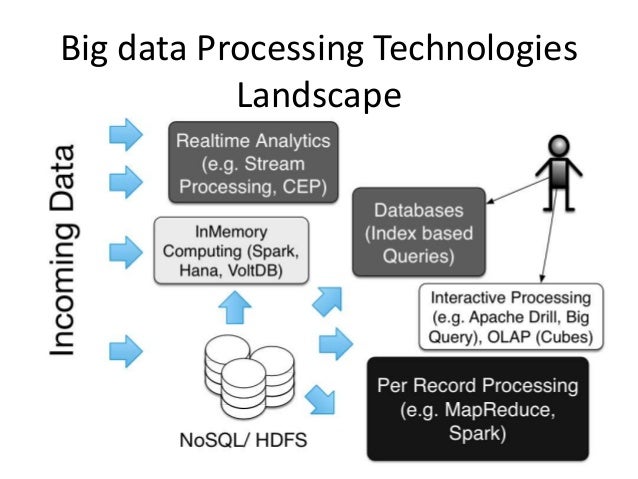
 Tools I categorised based on following taxonomy based on what they do. Note there are tools for streaming (a.k.a. realtime) analytics as well as for store and processing.


Also I categorised Analysis techniques, or in other words making sense of data, based on what they are used to achieve into three sub topics based on the goals.
  1. To know what happend - this is basic analytics 
  2. To explain what happend - this is detecting patterns. e.g. data mining. 
  3. To forecast what will happen - this is forecasting models e.g. regression, numerical modes (e.g. weather models that use simulation) and other machine learning algorithms etc. 

 Following is the slidedeck I used, and please check it out for more information.


Slides for the talk Internet of Things and Big Data

Couple of weeks back, I did a talk about Internet of Things and Big Data at Export Development Board auditorium. Following are the slides for the talk. You can find a writeup about the seminar from http://readme.lk/the-next-big-wave-internet-of-things/ and recording is available from youtube.


Strata 2014 Talk:Tracking a Soccer Game with Big Data

In January I did a talk at Oreilly Strata SF 2014 about how we solved the DEBS grand challenge, which involved processing data collected from a sensors in the ball and players boots in a football Game. I had blogged about some of the details before.  Following is the slide deck I used for the talk.


Also following is the abstract.

 Mobile devices, sensors and GPS are driving the demand to handle big data in both batch and real time. This presentation discusses how we used complex event processing (CEP) and MapReduce based technologies to track and process data from a soccer match as part of the annual DEBS event processing challenge. In 2013, the challenge included a data set generated by a real soccer match in which sensors were placed in the soccer ball and players’ shoes. This session will review how we used CEP to implement DESB challenge and achieved throughput in excess of 100,000 events/sec. It also will examine how we extended the solution to conduct batch processing using business activity monitoring (BAM) using the same framework, enabling users to obtain both instant analytics as well as more detailed batch processing based results.

View, Act, and React: Shaping Business Activity with Analytics, BigData Queries, and Complex Event Processing

Following is the slides for my talk at WSO2Con San Francisco 2013. It talks about how to use WSO2 BAM and WSO2 CEP to build big data solutions that handles both realtime processing as well as batch processing.


View, Act, and React: Shaping Business Activity with Analytics, BigData Queries, and Complex Event Processing from Srinath Perera

Following is the abstract.

Sun Tzu said “if you know your enemies and know yourself, you can win a hundred battles without a single loss.” Those words have never been truer than in our time. We are faced with an avalanche of data. Many believe the ability to process and gain insights from a vast array of available data will be the primary competitive advantage for organizations in the years to come.

To make sense of data, you will have to face many challenges: how to collect, how to store, how to process, and how to react fast. Although you can build these systems from bottom up, it is a significant problem. There are many technologies, both open source and proprietary, that you can put together to build your analytics solution, which will likely save you effort and provide a better solution.

In this session, Srinath will discuss WSO2’s middleware offering in BigData and explain how you can put them together to build a solution that will make sense of your data. The session will cover technologies like thrift for collecting data, Cassandra for storing data, Hadoop for analyzing data in batch mode, and Complex event processing for analyzing data real time.

Where the mind is without fear

Following is a poem by Rabindranath Tagore, which to me in the same class as "Invictus", "Man in the arena", "IF" or "Desiderata (Desired Things)". (If you have not read those, check them out also). It is amazing how close does he it into ideals of "free society" and ideas like opensource. I love the part "Where the clear stream of reason has not lost its way Into the dreary desert sand of dead habit".

Where the mind is without fear and the head is held high
Where knowledge is free
Where the world has not been broken up into fragments by narrow domestic walls
Where words come out from the depth of truth
Where tireless striving stretches its arms towards perfection
Where the clear stream of reason has not lost its way Into the dreary desert sand of dead habit
Where the mind is led forward by thee into ever-widening thought and action
Into that heaven of freedom, my Father, let my country awake.

Wednesday, December 18, 2013

Should I be Tuning GC?

Java VM now do a pretty good job picking a GC algorithm. Often any tuning we do make things worse. I have seen several times that all you have to do to fix a issue is take take away GC tuning parameters that are there. (Unfortunately often after weeks of debugging)

How do you decide to GC or not to GC?

To measure GC, we use a measure called JVM throughput. JVM throughput measures the percentage of time it did not spent on GC (in other words, time it spending doing useful work). If JVM throughput is greater than 90%, you should NOT be tuning GC. If it is less, then may be you should.

OK, then how do you measure JVM throughput?
  1. Run you program with following GC parameters.This will write the GC logs to gc.log file of the home directory
  2. -Xloggc:gc.log -XX:+PrintGCDetails -XX:+PrintGCTimeStamps
    
  3. To analyse, download and unzip GC Viewer from https://github.com/chewiebug/GCViewer/releases
    Start the GC viewer by running following command from the unzipped directory.
    $java -jar gcviewer-1.32.jar
    
  4. Then open the gc.log file and it shows the throughput.


Also you can use IBM pattern modelling tool from alpha works.

Monday, October 7, 2013

Common usage patterns for WSO2 ESB Mediators

Few weeks back, I spent a week digging into WSO2 ESB in detail. When you get started, it is bit tricky to figure out what parts should be used where and when. I thought it is useful to write down some of the common patterns/ best practices on using WSO2 ESB Mediators.


As shown by the diagram, ESB sits between the services and clients and provide mediation. Mediation provides one or more of the following functions.

1. Message conversion and Transport switching
2. Routing
3. Filtering (e.g. security termination)
4. Service Chaining & Aggregation

Let us look at each function and discuss some of the constructs from WSO2 ESB that you can use to implement them. WSO2 ESB provides an operator called mediator and most functionality is implemented as a Mediator.  When describing how you can get ESB to do something, I will just name the mediator at appropriate places. You can find more information about how to use the mediator from WSO2 ESB documentation (http://docs.wso2.org/display/ESB480).

You first start by receiving a message. You can receive a message via a Proxy Service, an API, or using a Main Sequence. After receiving the message you can use mediators to change or reroute messages as needed.

Message conversion and Transport switching 

When you do message conversion, if you are changing only small part of the message, then you can use the enrich mediator, However, if you mostly rebuilding the message from ground up, you are better off with the payload factory mediator that let you type in the message as a template and insert values at the right place. Finally if you are doing complex transformations like expanding a list in the source message, then you should use XSLT mediator. You may also use FastXSLT Mediator, Smooks Mediator, XQuery Mediator when applicable.

WSO2 ESB can receive and send messages via many transports like HTTP, SOAP, JMS, FTP, Email, FIX etc. You can switch a message from one to the other transport by configuring transports and using Send mediator with the correct transport.

Filtering 

Filtering stops some of the messages from proceeding further. You can use Filter Mediator, Throttle Mediator or security mediators like Entitlement Mediator, Validate Mediator, and OAuth Mediator.

Routing 

Routing can change the path of the message based on runtime conditions.

Sometime this is done via endpoints like load balancing endpoints or fault tolerant endpoints to achieve load balancing or fault tolerance. You can also use Conditional Router Mediator, Event Mediator, Router Mediator, Switch Mediator, and URLRewrite Mediator. It is worth noting that if the routing send the message out more than once, you need to use clone mediator to make a copy before calling send mediator.

Service Chaining 

Service chaining let you add information retrieved from other sources like Web services databases etc., with the current service call. For this you can often use service-chaining pattern. There are two ways to implement service chaining. Out of those, it is recommended to use “receive” property in the send mediator to receive the service response for service chaining.

You can further use Callout Mediator, DBLookup Mediator, DBReport Mediator and EJB Mediator.

Sometime we need do calls with multiple threads and collect results of those calls. For that you can use Aggregate Mediator, Clone Mediator, and Iterate Mediator. Here Clone mediator is used to create another execution path for the message (e.g. Thread). Iterate Mediator is used to repeatedly do the same task using different inputs. You can use aggregate mediator to collect results from both Clone and iterate mediators.

There are other mediators like Cache Mediator, Drop Mediator, Fault Mediator, Log Mediator etc, and use can find more information from the WSO2 ESB documentation.

Enjoy!!